Free public course · 37/40
Chapter 37: Practical Case Two: Old-System Migration (An Unnamed Business System)
Lesson objectives
Required artifact: legacy-system migration path
O1 · Can state the input-output order of legacy seam, parallel validation and incremental cutover (artifact: legacy-system migration path)
Evidence: The legacy-system migration path connects legacy seam, parallel validation and incremental cutover in input-output order
O2 · Can construct a legacy-system migration path with an owner and completion rule at every step (artifact: legacy-system migration path)
Evidence: Every step in the legacy-system migration path states its owner, input, output and completion rule
O3 · Can identify a legacy seam, run parallel validation and decide an incremental cutover (artifact: legacy-system migration path)
Evidence: The artifact records one seam, parallel comparison, cutover condition and rollback point
Before this lesson: Chapter 36: Practical Case One: Building an API Gateway with Auth and Rate Limiting from Scratch
Novice path
Chapter transfer task: Can identify a legacy seam, run parallel validation and decide an incremental cutover. Use the diagram's flow relationship to complete the first evidence item in the legacy-system migration path, then check each owner and decision rule.
Experienced path
Apply this task to a current project before reading the explanation: Can identify a legacy seam, run parallel validation and decide an incremental cutover. Submit the legacy-system migration path, then check the relationship type, missing evidence and authority boundary.
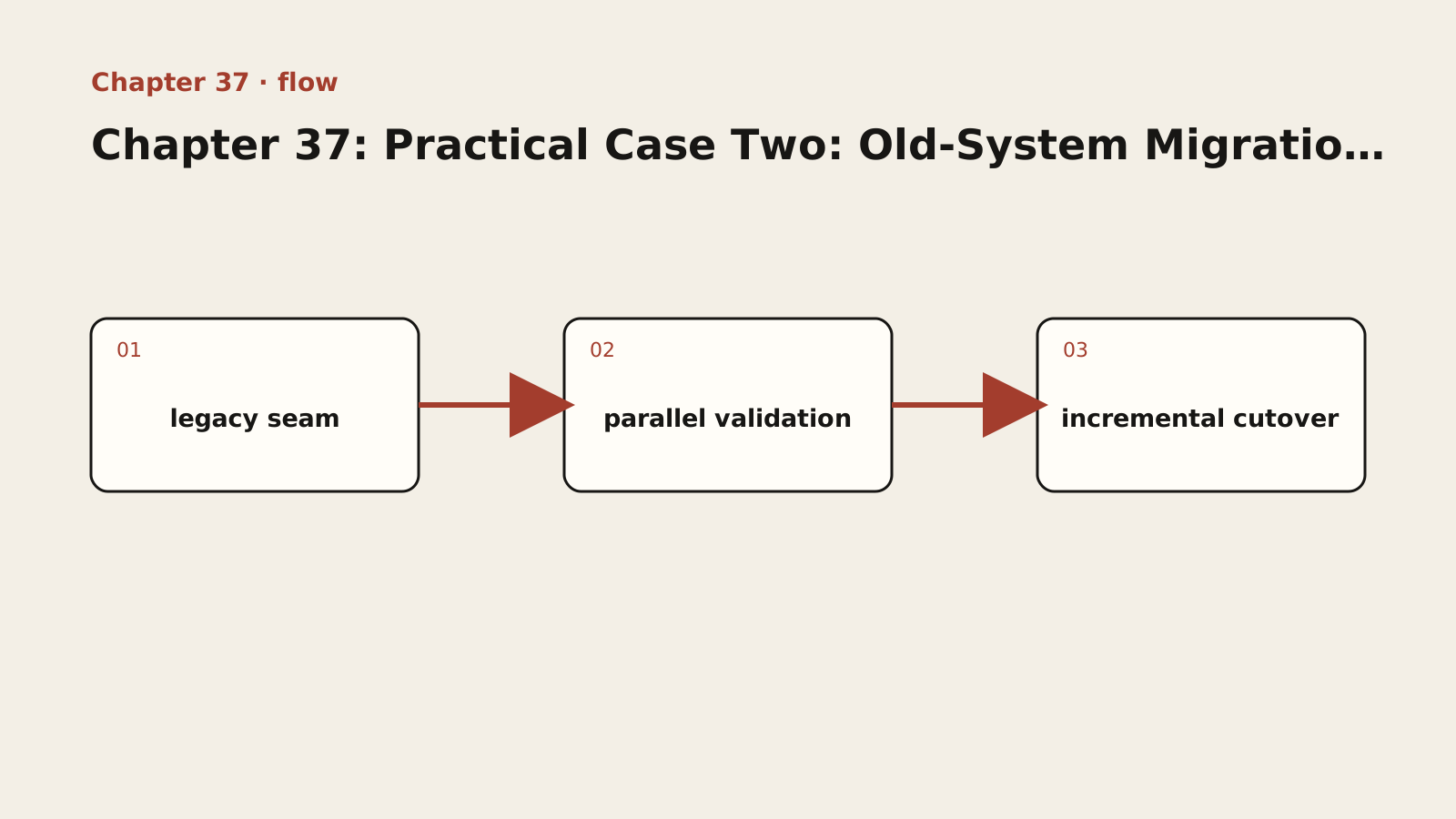
Diagram text description
The diagram connects legacy seam, parallel validation and incremental cutover from left to right. Each arrow means one output becomes the next input. Every step needs an owner and completion rule; missing exit evidence causes rework or a stop.
Relationship semantics: The three steps connect through one-way inputs and outputs; each must create a reviewable input for the next and end with an exit decision.
Adapted public course. Concepts, procedures and examples are adapted from the internal textbook. Case sizes, timings, improvement figures and target thresholds are illustrative, not site delivery results or universal standards. Verify tools, platforms and skills in your environment. Prompts do not grant permissions and retry counts do not authorize recovery. Preserve work and verify targets, sharing and external-state effects first.
Lesson explanation
37.1 Five Key Decision Points: Requirements Analysis, Architecture Design, Fix Tasks, Integration Acceptance, Deployment
Project Background: What follows is a pedagogically recomposed retrospective of a legacy-system migration — the narrative is assembled from typical decision fragments of real migration projects, and the specific numbers (file counts, document line counts, gap counts, and so on) are demonstration magnitudes that do not correspond to any single project record.
- Backend: Java + Spring Boot, 432 source files;
- Frontend: Vue 3, 4 frontend applications (admin, organization, examiner, mini program);
- Database: MySQL;
- Deployment: Docker + GitHub Actions;
- Scenario: Rebuild a new system based on the old production system’s interface and functionality;
- Challenge: The old system had a 3248-line functional description document; we needed to compare field by field to ensure the new system didn’t miss any functionality.
This case is different from other chapters: Previous chapters taught “what to do under ideal conditions”; this chapter shows “how to make trade-offs under realistic constraints.” There is a gap between the two — and that gap is the most valuable part.
Key Decision Point One: Requirements Analysis — which skill to use.
Faced with “old-system migration,” you might think: use the Requirements skill for requirements analysis. But in actual project practice, this decision faces a choice: use Requirements to analyze requirements from scratch, or use Legacy Recon to recover requirements from the old system?
- Reason to choose Requirements: complete methodology, deriving the requirements document layer by layer from Event Storming; suitable for “from-scratch” projects;
- Reason to choose Legacy Recon: the old system already exists, all functionality is already running. Rather than “re-analyze,” better to “compare field by field” — decompose the existing functionality of the old system, compare it against the new system’s implementation, and find the gaps.
Final choice: Legacy Recon. Because the old system had a 3248-line functional description document plus complete interface snapshots — this information is more accurate and complete than “re-analyzing.” Requirements requires business stakeholders to participate in discussions, while Legacy Recon only needs to compare against the existing implementation.
Core logic of this decision: When existing information is more reliable than “re-analyzing,” prefer existing information. The old system is already live and running; its functional description is a precise mapping of real requirements — more accurate than any “analysis.”
Key Decision Point Two: Architecture Design — whether to design from scratch.
After the gap report came out, the team faced the second key decision: redesign the architecture, or augment functionality within the existing architecture?
- Reason to redesign: the old system’s architecture may have problems; rebuilding is a good chance to optimize;
- Reason to augment in place: the new system is already live and running; the architecture is proven stable. Redesigning introduces uncertainty and risk.
Final choice: augment within the existing architecture. Reason: of the 49 gaps in the gap report, all were “feature omissions,” not “architecture problems.” No architectural problems means no need to touch the architecture.
Core logic of this decision: The value of architecture design is to solve problems, not to design for design’s sake. If the problem is not at the architecture level, don’t touch the architecture.
Key Decision Point Three: Fix Tasks — whether to use Workflow.
After the 49 gaps were prioritized, the third key decision: should fix tasks run automatically via Workflow, or be manually guided via Coach?
- Reason to choose Workflow: most of the 49 gaps are “supplement missing features” — requirements are clear, technical solutions are well-defined, fitting Workflow’s applicability conditions;
- Reason to choose Coach: some fix tasks involve coordinated changes across multiple modules, needing repeated confirmation and adjustment.
Final choice: hybrid use. Use Workflow’s auto mode for “clear-requirement, single-module” fix tasks; use Coach for manual guidance on “multi-module, confirmation-needed” complex fix tasks.
Fictional retrospective example: a frontend-backend fix ran in Workflow auto mode, and acceptance found inconsistent interface contracts. The evidence shows that the single-module gate omitted a cross-module contract check; it does not establish the tool as the sole cause. The team added a cross-module consistency check, and recorded reruns did not find the same defect again. That observation does not guarantee it cannot recur.
Key Decision Point Four: Integration Acceptance — how to prioritize fixes.
After all fix tasks passed independent acceptance, integration acceptance found two problems. The fourth key decision: how to arrange fix priorities?
- Reason to “fix everything before release”: although small, they’re all “inconsistencies” that, accumulated, lower system quality;
- Reason to “release after fixing critical, defer non-critical to next iteration”: neither problem affects the core business flow (student registration → exam → certificate issuance); they can be fixed gradually after release.
Final choice: a compromise — distinguish “blocking” from “non-blocking” problems. The cache-refresh problem was blocking — it affects users seeing the latest data, must be fixed before release. The date-format problem was non-blocking — doesn’t affect functionality; planned for the next iteration.
Core logic of this decision: Not every problem needs to be fixed in the same version. The ability to distinguish “must-fix” from “can-wait” is judgment born of experience.
Key Decision Point Five: Deployment — how far to automate.
The fifth key decision: should the deployment process be fully automated, or semi-automated?
- Reason for full automation: Docker + GitHub Actions already configured, full CI/CD is possible;
- Reason for semi-automation: the project involves 4 frontend apps + 1 backend app + 2 databases + 1 cache; full automation may lead to “automated but no one dares use it.”
Final choice: semi-automation — auto-build + manual deploy. GitHub Actions automatically completes build and test, but deploying to production requires manually running a deploy.sh script (supports IP:port mode HTTP access, domain mode Caddy auto-HTTPS).
Core logic of this decision: The purpose of automation is to reduce risk, not increase it. If full automation makes you feel “out of control,” keep a manual-confirmation step. As the project stabilizes, you can gradually increase the degree of automation.
37.2 Legacy Recon’s “Field-by-Field Comparison” Method
Execution Process: Legacy Recon (old-system recovery) specifically handles “old system → new system” migration scenarios.
- Step One: Build the to-do list. Split the 7 major business modules into independent audit tasks;
- Step Two: Parallel audit. Each module is audited by an independent sub-agent, comparing field by field / feature by feature the old and new systems’ implementations. Audit method: frontend code to check interface implementation, backend code to check API implementation, database schema to check data models, collate gaps (present / missing / partially implemented);
- Step Three: Produce the gap report. Sort by “foundation first”; high, medium, low all included, layered.
Output Example (gap report):
Example type: reference. Reference fragment; it is not guaranteed to run alone. Adapt it to the lesson context, project versions and real interfaces, then validate with observed output.
- High priority: 15 items (affect core flow)
- Medium priority: 23 items (affect user experience)
- Low priority: 11 items (optimization)
- Third-party dependency notes: 5 items (need external credentials, deferred)
Execution of a typical fix task — task: supplement the organization-side student batch-import feature:
- Issue Instruction (with requirements, technical constraints, acceptance criteria — use existing Excel parsing tool, input validation rules consistent with single-add, import result page shows success/failure list);
- Coding: AI completes file upload, Excel parsing, data validation, batch write;
- Acceptance: Functional check (import works, field validation correct), architectural check (no core code modified, data model consistent), security check (uploaded file type validation, SQL injection protection) → conclusion PASS → commit.
Progress Management (progress ledger job.progress.md):
Example type: reference. Reference fragment; it is not guaranteed to run alone. Adapt it to the lesson context, project versions and real interfaces, then validate with observed output.
## Old-System Feature Backfill -- Progress Ledger
## Completed
- [x] Organization - student batch import (2026-07-13)
- [x] Organization - qualification change record (2026-07-13)
- [x] Admin - examiner assignment (2026-07-14)
- ...
## In Progress
- [ ] Organization - financial report export
## To Do
- [ ] Admin - data statistics dashboard
- [ ] Examiner - scoring feature
37.3 Which Skills Were Used, Which Weren’t, and Why
Skills used:
| Skill | Usage Scenario | Degree of Use |
|---|---|---|
| Legacy Recon | Old-system functionality audit | Core |
| Inspector | Acceptance of each fix task | Core |
| Workflow | Automated execution of fix tasks | Core |
| Advisor | Technical decisions | Auxiliary |
| Coach | Guidance for some complex features | Auxiliary |
Skills not used, and why:
| Skill | Why Not Used |
|---|---|
| Architect | Not designing from scratch; augmenting within existing architecture |
| Orchestrator | Fix tasks had no complex dependency chains; could be executed directly by priority |
| Job | Project already exists; no need to start from scratch |
| POC | Already had old-system interface reference; no prototype needed |
| Requirements | Requirements came from the old system; already clear |
Retrospective: The Value of Experience: Knowing When Not to Use a Skill
Key lessons:
- The key to old-system migration is “field-by-field comparison”: don’t rely on documentation descriptions; compare the actual implementations of old and new systems field by field;
- Parallel auditing boosts efficiency: auditing the 7 major business modules in parallel was clearly faster than sequential at this case’s scale (the 3-4x figure is a demonstration magnitude for this case);
- Execute by priority: foundation first (data models, core interfaces), then user-visible features, finally optimizations;
- Keep the progress ledger transparent: an append-only progress ledger lets everyone know the project status at any time.
This case demonstrates the most important capability in real-world project practice: making choices among multiple options and giving a reason for each choice. The five key decision points — using Legacy Recon instead of Requirements for requirements analysis, augmenting within the existing architecture instead of redesigning, hybrid Workflow/Coach for fix tasks, distinguishing blocking/non-blocking problems at integration acceptance, choosing semi-automation over full automation for deployment — none of these decisions was “theoretically optimal,” but “the most appropriate under the constraints at the time.”
That is the value of experience: knowing when to use which skill, and more importantly, knowing when not to use which skill.
Independent exercise
Use fictional or authorized deidentified material. Answer independently before revealing the reference. Save chapter-37.md with versions, decisions, evidence and gaps.
Map an old fictional ticket module to new fields, mark complete/partial/missing status, and define data, API and UI comparisons and cutover gates.
Required chapter artifact: legacy-system migration path
The submission for this independent exercise must contain the evidence below. The existing prompts supply content but do not replace these acceptance items.
- O1: The legacy-system migration path connects legacy seam, parallel validation and incremental cutover in input-output order
- O2: Every step in the legacy-system migration path states its owner, input, output and completion rule
- O3: The artifact records one seam, parallel comparison, cutover condition and rollback point
Reveal reference feedback (answer first)
Reference feedback
Map semantics, units, nulls, access and compatibility; compare API status/errors and UI actions/states. Preserve source data and rehearse recovery, validating cutover or dual-write consistency. Textbook scale and speed are illustrative, not site customer results. UI similarity does not prove migration success.
Self-review and next steps
Check whether your decision is explicit, evidence reproducible and unknowns honestly recorded. The reference illustrates one defensible approach, not a unique answer. Seek peer review for alternatives with equivalent evidence. Mark unsupported parts unfinished and revisit the corresponding step.
Sources and boundaries
Registered sources support only the external claims used here. The legacy-system migration path, example numbers and exercise scenario are internal instructional design and require project-specific validation.
- Strangler Fig legacy modernization
Martin Fowler · 2026-09-17 · Legacy systems can reduce big-bang replacement risk by identifying seams, isolating small components and replacing them incrementally.
Record lesson practice
Only a browser self-check is saved. No work is uploaded, reviewed or certified. Keep evidence and gaps in your own chapter file.