Free public course · 7/40
Chapter 7: The Six-Step Workflow: The Core Process of AI-Assisted Coding
Lesson objectives
Required artifact: six-step milestone record
O1 · Can trace the forward and feedback paths among decompose and instruct, code and validate and branch and update (artifact: six-step milestone record)
Evidence: The six-step milestone record draws both a forward path and a return path across decompose and instruct, code and validate and branch and update
O2 · Can construct a six-step milestone record with the input, decision and write-back evidence for every pass (artifact: six-step milestone record)
Evidence: Every stage in the six-step milestone record states its input, decision, output and owner
O3 · Can use the six-step method to reach a traceable milestone rather than optimize commit count (artifact: six-step milestone record)
Evidence: The artifact retains all six steps and at least one version point tied to acceptance evidence
Before this lesson: Chapter 29: The Outer Knowledge Loop
Novice path
Chapter transfer task: Can use the six-step method to reach a traceable milestone rather than optimize commit count. Use the diagram's loop relationship to complete the first evidence item in the six-step milestone record, then check each owner and decision rule.
Experienced path
Apply this task to a current project before reading the explanation: Can use the six-step method to reach a traceable milestone rather than optimize commit count. Submit the six-step milestone record, then check the relationship type, missing evidence and authority boundary.
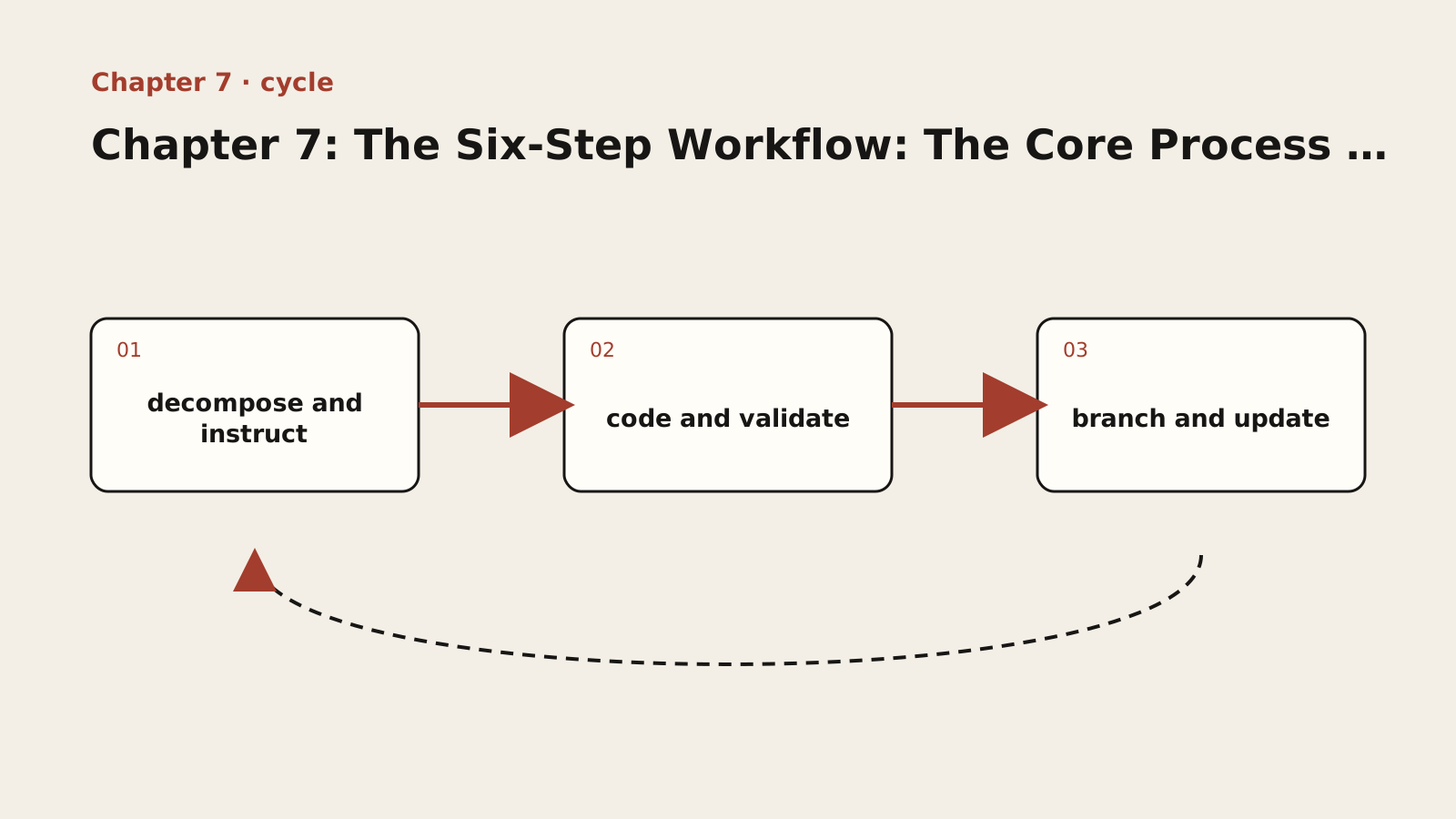
Diagram text description
The diagram moves forward from decompose and instruct through code and validate to branch and update, then returns by a dashed path. Forward arrows produce a result; the return path carries observation and correction. If results do not alter the next input, this is a one-way flow rather than a loop.
Relationship semantics: Three stages produce a result along the forward path, then observations return to change the next input; without write-back there is no loop.
Adapted public course. Concepts, procedures and examples are adapted from the internal textbook. Case sizes, timings, improvement figures and target thresholds are illustrative, not site delivery results or universal standards. Verify tools, platforms and skills in your environment. Prompts do not grant permissions and retry counts do not authorize recovery. Preserve work and verify targets, sharing and external-state effects first.
Lesson explanation
7.1 Why You Need a Process
Imagine you just installed an AI coding tool and want to try it out. You type: “Build me a notepad app.”
AI starts generating code. Files are created one by one, code is output line by line. It looks impressive — the interface is attractive, and the features seem complete.
But when you look closely, you find problems: the data is stored in the browser’s localStorage, but you wanted it on a server; the tech stack isn’t what your team uses; some code looks complex, but you only need simple functionality.
This is what happens without a process. AI is powerful, but if you don’t align on goals, it may build something entirely different from what you need.
Why? A model cannot access project facts that you have not supplied or authorized tools to read. If the team’s stack, data location and scale target are absent from context, it must fill the gaps. The result may run, but there is no evidence that it satisfies the real constraints.
A good process ensures AI always works in the right direction. It doesn’t limit AI’s capabilities — it channels them in the right direction.
From the “mental leap” in Part Two to here, the methodology starts to take shape. The Six-Step Workflow is the core track for guiding AI.
7.2 Overview of the Six Steps: Decompose -> Issue Instructions -> Code -> Validate -> Branch Decision -> Update the Blueprint
The Six-Step Workflow breaks an AI coding task into six steps, forming a closed loop:
Example type: pseudocode. Pseudocode; it is not executable. It expresses decision order only, so implementation must supply real interfaces, authority and error handling.
Decompose -> Issue Instructions -> Code -> Validate -> Branch Decision -> Update the Blueprint
                                                                    |
                                                              Return to "Decompose" (next milestone)
Each step has a clear objective and output:
| Step | What to Do | Output |
|---|---|---|
| Decompose | Break feature requirements into small tasks (milestones) | Milestone list |
| Issue Instructions | Tell AI what to do now (including acceptance criteria) | Clear instructions |
| Code | AI executes the coding | Code files |
| Validate | Check whether the code meets requirements | Validation result (PASS / NEEDS_FIX / REBUILD) |
| Branch Decision | Decide the next step based on validation result | Next action |
| Update the Blueprint | Write new findings into the blueprint | Updated blueprint |
7.3 Detailed Breakdown and Deliverables for Each Step
Step 1: Decompose.
What to do: Break the feature you want to implement into several small tasks, each called a “milestone.”
Why this step is so important: Because AI’s context window is limited. If you hand a complex task to AI all at once, it will jump between multiple features, resulting in tightly coupled code that is hard to debug. The core purpose of decomposition is not to “make big things small,” but to isolate risk — each milestone is completed and validated independently, so even if one milestone has problems, it won’t affect other parts.
What a good decomposition looks like: For a “notepad app,” you might decompose it as:
- Milestone 1: Create the project scaffold (project structure, config files)
- Milestone 2: Implement the note list page (display all notes)
- Milestone 3: Implement the note editing page (create and edit notes)
- Milestone 4: Implement note deletion
- Milestone 5: Add search functionality
Decomposition principles:
- Each milestone should be small enough for one focused work cycle; the actual duration depends on the team, codebase and risk. If its input, artifact and validation method cannot be stated before work starts, decompose it further.
- Each milestone should be independently validatable. You should be able to test it immediately after completion.
- Milestones should have a dependency order. Build basic features first, then upper-layer features.
How to collaborate with AI:
Help me decompose the “notepad app” into independently implementable and verifiable milestones. For each, list inputs, artifact, dependencies, stop condition and validation command; label duration as an estimate when it has not been measured.
Step 2: Issue Instructions.
What to do: For the current milestone, issue clear instructions to AI.
Why instruction quality matters: clear inputs, constraints and acceptance criteria reduce the space in which a model must invent missing requirements, but they do not guarantee correct code. A vague instruction such as “implement user login” leaves many decisions unresolved. A stronger instruction states the authentication mechanism, session lifetime, error semantics and security boundary, then still requires tests and human review. Acceptance-driven development begins by defining the evidence for acceptance before asking AI to code.
What good instructions contain:
Example type: reference. Reference fragment; it is not guaranteed to run alone. Adapt it to the lesson context, project versions and real interfaces, then validate with observed output.
We need to implement Milestone 2: Note list page.

Requirements:
- Display the title and last updated time of all notes
- Sorted by last updated time in descending order
- Clicking a note navigates to the edit page
- Support pagination, 10 items per page

Technical constraints:
- Use Next.js App Router
- Data fetched via API (API already implemented in Milestone 1)
- Use Tailwind CSS for styling

Acceptance criteria:
- Page loads correctly and displays the note list
- Pagination works correctly
- Clicking a note navigates to the edit page
The four elements of an instruction:
- What to do — the goal of the current milestone;
- Requirement details — specific feature requirements;
- Technical constraints — technical conventions that must be followed;
- Acceptance criteria — how to determine the task is complete.
Step 3: Code.
What to do: AI generates code based on your instructions. In this step, you observe AI’s work but do not intervene.
What you should do during this phase:
- Observe whether AI-generated files match expectations;
- If AI misunderstands something, point it out after it finishes the current file;
- Do not interrupt AI’s coding process to modify details — wait for the validation phase to handle everything at once.
Common issues:
- What if AI uses a library I’ve never heard of? Make a note of it and evaluate during the validation phase. If the library meets requirements and doesn’t add extra burden, it’s acceptable.
- What if AI writes code beyond the current milestone? Gently remind it: “This feature will be implemented in a later milestone. Please finish the current task first.”
Step 4: Validate.
What to do: Check whether AI-generated code meets requirements. This is the step most often skipped among the six, but also the most important.
Why validation cannot be skipped: Because fluent, plausible generation does not prove correct logic. A model predicts a token distribution from context; only greedy decoding selects the most probable token at each step, while sampling draws from the distribution (see Transformers generation strategies). Its code may therefore look “right,” but logic errors, edge cases, and security vulnerabilities are not obvious at a glance. Validation is not about distrust — it is a fundamental engineering practice, just as you wouldn’t sign for a package without inspecting it. The validation target in this chapter is code; when a milestone’s changes affect model behavior (prompts, model, sampling parameters, context), code review cannot catch the quality of model outputs — for evaluating model output quality, see Chapter 23.
Validation checklist:
- Functional check — Are all features implemented per acceptance criteria?
- Code check — Is the code style consistent? Are there obvious quality issues?
- Edge case check — Are edge cases handled (empty data, invalid input, etc.)?
- Security check — Are there obvious security issues (e.g., SQL injection, XSS)?
- Blueprint check — Does the code follow the project architecture conventions?
How to validate: You can review the code yourself, or have AI help you check. An effective approach is to have AI perform a self-check:
Validate the code for the current milestone. Check: 1. Whether all features are implemented; 2. Whether code quality is acceptable; 3. Whether edge cases are handled; 4. Whether there are security vulnerabilities; 5. Whether it follows the project architecture.
Step 5: Branch Decision.
What to do: Decide the next step based on the validation result.
After validation, there are three possible outcomes:
- PASS: Code meets requirements. Action: commit the code to git, then move to the next milestone. Example commit message:
feat: implement note list page. - NEEDS_FIX: Minor issues need fixing. Action: describe the issue to AI, have it fix it, then re-validate. Example: “The pagination buttons on the list page have the wrong style — they should be round, not square. Fix and re-validate.”
- REBUILD: Too far off the blueprint. Action: use Section 10.4 to distinguish a personal, unshared branch from shared commits, preserve needed work, and verify the target before choosing a safe recovery path; then issue new instructions. Example: “This implementation uses a state-management library I do not know; I will return to a clean milestone through a verified recovery path, then redo it more simply.”
Decision criteria:
| Signal | Should You REBUILD? |
|---|---|
| Modified core code that shouldn’t have been changed | Yes |
| Introduced unnecessary complex technology | Yes |
| Single file bloated severely (over 300 lines) | Consider |
| Multiple minor issues but core logic is correct | NEEDS_FIX |
Why REBUILD is more important than NEEDS_FIX: Many beginners hesitate when they see REBUILD — “All that work, and now I have to throw it away?” But AI generation cost and human review cost are not symmetric. Chapter 7 retains this signal table for quick use in the workflow; the complete total-cost calculation and applicability boundary are in Section 7.5.
Step 6: Update the Blueprint.
What to do: If you discover new findings during implementation (such as a better technical approach or a flaw in the original design), write these findings into the blueprint.
Why update the blueprint? The blueprint is AI’s “working memory” — after each conversation resets, AI rebuilds its understanding of the project from the blueprint. If the blueprint is outdated, AI will make decisions based on incorrect information. So the blueprint is not a one-time document, but a living document that is continuously updated.
When to update the blueprint:
- You discover a better technical approach;
- The original design has omissions or errors;
- New requirements emerge that weren’t considered before;
- The decomposition of a milestone needs adjustment.
7.4 A Complete Example: Pagination for the Note App
Let’s demonstrate the Six-Step Workflow with a complete example.
Scenario: Add pagination to the note list page.
Step 1: Decompose. This is a small feature that doesn’t need further decomposition. The entire feature is one milestone.
Step 2: Issue Instructions.
Example type: reference. Reference fragment; it is not guaranteed to run alone. Adapt it to the lesson context, project versions and real interfaces, then validate with observed output.
Add pagination to the current note list page.

Requirements:
- Display 10 notes per page
- Show pagination controls at the bottom (previous, next, page numbers)
- No full page refresh when switching pages

Technical constraints:
- Backend API already supports page and size parameters
- Use existing UI component library
- Place pagination controls at the bottom of the page

Acceptance criteria:
- Pagination controls display correctly
- Clicking page numbers switches correctly
- "Previous" button is disabled on the first page
- "Next" button is disabled on the last page
- Total page count is displayed correctly
Step 3: Code. AI generates the pagination component and related logic. You observe that it uses existing components from the project.
Step 4: Validate. You check and find that pagination works correctly, but the edge case “disable the previous button on the first page” was not handled.
Step 5: Branch Decision. The result is NEEDS_FIX. You tell AI to fix this edge case. AI fixes it and you re-validate — it passes. The result changes to PASS.
Step 6: Update the Blueprint. You discover a case that wasn’t previously considered: when there are very few notes (e.g., only 3), the pagination controls should not be displayed. Update this finding in the blueprint.
Then move to the next milestone.
7.5 Repair or Rebuild: Count the Full Cost
These are teaching assumptions, not customer measurements or industry benchmarks: failure is confined to an independent unreleased milestone, the accepted foundation is recoverable, and requirements and interfaces are clear. Price everything in RMB and provisionally value labor at RMB 200 per hour. Past effort is sunk; compare incremental costs from now on.
| Cost item | Local repair | Controlled recovery and rebuild |
|---|---|---|
| Protect needed work and verify the recovery point | 0.5 hours × 200 = RMB 100 | 0.5 hours × 200 = RMB 100 |
| Understand tangled logic / rewrite boundaries and instructions | 2 hours × 200 = RMB 400 | 1 hour × 200 = RMB 200 |
| Editing or generation tool charges | RMB 20 | RMB 40 |
| Human review, regression and integration verification | 1.5 hours × 200 = RMB 300 | 1.5 hours × 200 = RMB 300 |
| Total cost from now | 100 + 400 + 20 + 300 = RMB 820 | 100 + 200 + 40 + 300 = RMB 640 |
Under these assumptions, rebuilding saves RMB 180 by reducing the work of understanding tangled logic, not by making generation free. List files and state to protect and verify the recovery path in Section 10.4 before deciding. Both paths must pay for review and validation.
Change the conditions and the conclusion may reverse. A legacy module carrying implicit business rules, migrations, or complex external state may require extra recovery, test coverage, and release coordination to rebuild. A localized defect with a clear boundary often warrants NEEDS_FIX instead. Record uncertainties and their upper bounds; never omit protection of existing work, downtime, or acceptance costs to make rebuilding look cheap. Chapter 8 uses this account to support discipline; Chapter 10 implements recovery. Neither introduces another calculation.
[Hands-On] Complete a Small Feature Using the Six-Step Workflow
Task: Add a “search by name” feature to an existing user list page, going through the complete Six-Step Workflow.
Guidance (what to do at each step):
- Decompose: Assess whether this feature can be a standalone milestone (it can — it doesn’t depend on other unfinished features). If it feels too large, break it into three sub-tasks: “search API parameters,” “search box UI,” and “real-time results refresh.”
- Issue Instructions: Write instructions containing all four elements — goal (add search functionality), requirements (input keywords for fuzzy name search, real-time refresh), technical constraints (backend API already supports search parameter, use existing component library, 300ms debounce), acceptance criteria (inputting keywords filters correctly, empty results show empty state, clearing search restores full list).
- Code: Let AI execute, observe only without interrupting.
- Validate: Check using the five-dimension checklist (functional / code / edge cases / security / blueprint). Pay special attention to edge cases — empty search keyword, matching only one result, including special characters.
- Branch Decision: PASS means commit (
feat: user list supports search by name); NEEDS_FIX means fix and re-validate; REBUILD means roll back and rebuild. - Update the Blueprint: Write the search feature’s API contract and debounce convention into the blueprint.
Validation points (for instructor/self-assessment):
- Did the student’s instructions contain all four elements?
- Did the student maintain “observe only” during the coding phase?
- Did the student’s validation cover edge cases?
- Was the student’s branch decision decisive and consistent with the cost-benefit analysis?
- Did the student update the blueprint after completion?
Pause and organise: complete the minimum loop
First write one relationship between decompose and instruct and code and validate, then place it in the six-step milestone record. Confirm that this step has an input, decision and evidence before adding branch and update; do not start the independent exercise until the three are connected.
Independent exercise
Use fictional or authorized deidentified material. Answer independently before revealing the reference. Save chapter-07.md with versions, decisions, evidence and gaps.
For an unknown-input misclassification, document decomposition, dispatch, coding, inspection, branch decision and documentation updates.
Required chapter artifact: six-step milestone record
The submission for this independent exercise must contain the evidence below. The existing prompts supply content but do not replace these acceptance items.
- O1: The six-step milestone record draws both a forward path and a return path across decompose and instruct, code and validate and branch and update
- O2: Every stage in the six-step milestone record states its input, decision, output and owner
- O3: The artifact retains all six steps and at least one version point tied to acceptance evidence
Reveal reference feedback (answer first)
Reference feedback
Preserve the failing fixture, restrict changes to classification, keep expectations fixed, run baseline and candidate checks, and choose PASS or NEEDS_FIX from evidence. Record versions and limits. Never report unexecuted checks as passing or workflow completion as customer delivery.
Self-review and next steps
Check whether your decision is explicit, evidence reproducible and unknowns honestly recorded. The reference illustrates one defensible approach, not a unique answer. Seek peer review for alternatives with equivalent evidence. Mark unsupported parts unfinished and revisit the corresponding step.
Sources and boundaries
Registered sources support only the external claims used here. The six-step milestone record, example numbers and exercise scenario are internal instructional design and require project-specific validation.
- Git reference
Git project · 2026-09-17 · Versions, branches, commits and recovery operations must be verified against repository state.
Record lesson practice
Only a browser self-check is saved. No work is uploaded, reviewed or certified. Keep evidence and gaps in your own chapter file.