# Chapter 6: Three Traps You Must Watch Out For
## Lesson objectives
- **O1** Can trace the forward and feedback paths among confirmation bias, patch entropy and context drift (artifact: three-trap diagnostic card)
- Evidence: The three-trap diagnostic card draws both a forward path and a return path across confirmation bias, patch entropy and context drift
- **O2** Can construct a three-trap diagnostic card with the input, decision and write-back evidence for every pass (artifact: three-trap diagnostic card)
- Evidence: Every stage in the three-trap diagnostic card states its input, decision, output and owner
- **O3** Can diagnose confirmation bias, patch entropy or context drift as the primary failure mode (artifact: three-trap diagnostic card)
- Evidence: The artifact labels the primary trap, evidence and corrective action in one failed episode
## Learning paths
- **Novice**: Chapter transfer task: Can diagnose confirmation bias, patch entropy or context drift as the primary failure mode. Use the diagram's loop relationship to complete the first evidence item in the three-trap diagnostic card, then check each owner and decision rule.
- **Experienced**: Apply this task to a current project before reading the explanation: Can diagnose confirmation bias, patch entropy or context drift as the primary failure mode. Submit the three-trap diagnostic card, then check the relationship type, missing evidence and authority boundary.
## Teaching diagram
- **Required artifact**: three-trap diagnostic card
- **Diagram kind**: risk-spiral
- **Relationship semantics**: Three stages produce a result along the forward path, then observations return to change the next input; without write-back there is no loop.
- **Core concepts**: confirmation bias · patch entropy · context drift
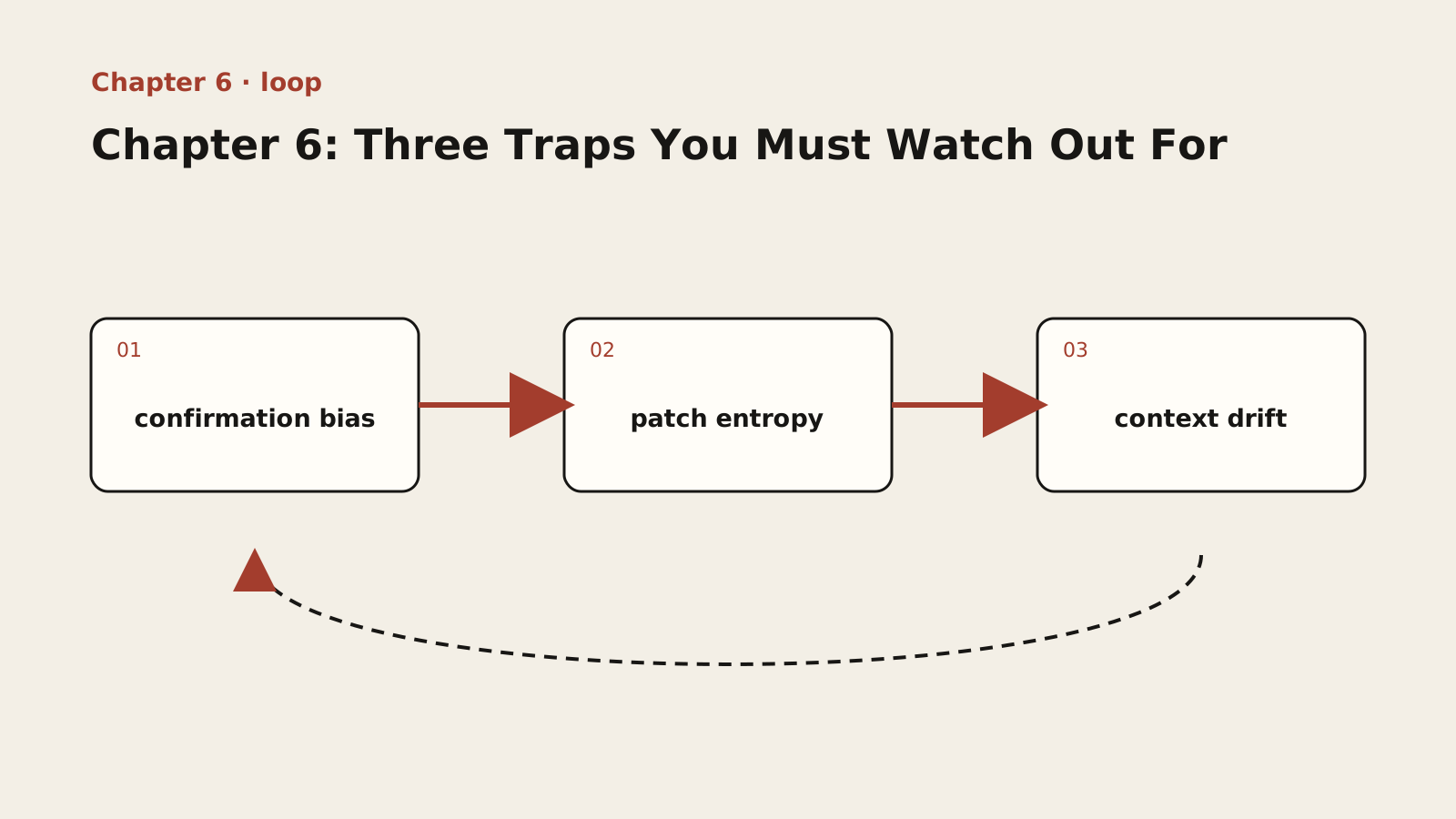
Inspect both directions of the three-trap diagnostic card and confirm that observed results change the next pass.
The diagram moves forward from confirmation bias through patch entropy to context drift, then returns by a dashed path. Forward arrows produce a result; the return path carries observation and correction. If results do not alter the next input, this is a one-way flow rather than a loop.
> **Adapted public course.** Concepts, procedures and examples are adapted from the internal textbook. Case sizes, timings, improvement figures and target thresholds are illustrative, not site delivery results or universal standards. Verify tools, platforms and skills in your environment. Prompts do not grant permissions and retry counts do not authorize recovery. Preserve work and verify targets, sharing and external-state effects first.
## Lesson explanation
You say: "We already know that AI is a super intern, that we ourselves are the decision makers, and that constraints are the first principle. What else do I need to watch out for?"
The answer is: three major traps. They are like swamps lurking in the jungle of code -- flat and harmless on the surface, but once you sink in, they pull you deeper and deeper, eventually dragging the entire project into the mire. They are extremely insidious because, much of the time, the "wrong" answers AI gives look "right" in the short term -- they run, they solve the immediate problem, and they may even pass your initial tests.
That is precisely what makes them dangerous. They do not crash the system right away; instead, like boiling a frog in warm water, they silently erode the project's health, maintainability, and scalability. Until one day, when you discover that a tiny requirement change requires modifying a dozen files, or that fixing one bug triggers five more, it is already too late.
### 6.1 Confirmation Bias: AI Digs Itself Deeper
Confirmation bias is a classic concept in psychology: people tend to seek out, interpret, and remember information that supports their existing beliefs or hypotheses. When this phenomenon occurs in AI, the consequences are far more serious, because AI lacks the human capacities for "reflection" and "self-correction."
The AI "confirmation bias" trap, in short, is this: once AI produces a preliminary, flawed design or fix based on incomplete or incorrect information, all of its subsequent behavior will stubbornly revolve around "patching up" and "defending" that wrong plan rather than fundamentally overturning it.
It is like a stubborn driver who takes a wrong turn at the very start of the journey. When you point out "I think we took a wrong turn," he does not choose to turn back onto the right road, but insists: "No, this is the right road; a right turn at that intersection up ahead will get us back on track." As a result, you drive farther and farther down the wrong road.
Root cause of the trap: AI's "one-way chain of thought."
To understand why AI behaves this way, we need to look once again inside its "brain." A large language model is essentially a probability-prediction engine -- its core task is "given the existing text, predict the next most likely word." When you give it a task, it generates a solution, and once that solution is written into the conversation history, it becomes part of the context. When you then point out a problem with it, AI takes both "my previous plan" and "the problem you raised" as new context.
In its probabilistic model, making "minor repairs" to the existing plan has a much higher probability than "completely tearing it up and starting over." It assumes that when you raise a problem, you want it to "refine" the plan, not "reject" it. This context-driven, linear, one-way "chain of thought" makes it extremely hard for AI to carry out a "revolutionary" act of self-overhaul.
[Field Scenario] An architecture disaster triggered by "confirmation bias."
Background: You are developing an internal admin console and need a user permission system. You issue your first instruction to AI: "Please design a front-end access control scheme with three roles: administrator (admin), editor, and guest."
Step one: AI plants the seed of "error." AI quickly produces a plan: in the front-end routing configuration, add a meta field to every route containing a roles array, then provide a route guard that checks the role on every navigation. Does the plan work? Yes. But it carries a fatal architectural flaw: it hardcodes permission logic into the front end -- every time you need to add a role or adjust permissions, you must modify front-end code and redeploy. The seed of error is planted.
Step two: you try to correct it, and AI's "confirmation bias" kicks in. After launch, the product manager asks to "add an 'auditor' role." A rational developer would reflect at this point: "Hardcoded roles are already causing pain; shouldn't I move permission checks to the back end?" But AI does not. Its "confirmation bias" is activated: it walks through every route configuration and manually adds 'auditor' to the meta.roles array of every single route -- it perfectly "executes" your instruction, and at the same time makes the terrible design even more deeply entrenched.
Step three: the disaster escalates, and AI digs itself deeper. A month later, the product manager requires "permissions must be dynamically configurable, without a front-end release." This is a requirement weighty enough to overturn the original design. By now, AI's "confirmation bias" is beyond saving -- it starts "showing off" with an extremely complicated plan: at application startup, the front end requests a "permission configuration table" JSON from the back end, recursively mutates the routing configuration object in memory, and it even suggests keeping a "full route table" on the front end, dynamically activating or hiding parts of it based on the permission configuration. Rather than admit that "the original hardcoded scheme was wrong," AI would rather implement, on the client side, an extremely complex piece of dynamic permission computation that rightly belongs on the server -- using tactical diligence to camouflage strategic laziness.
This is the most terrifying aspect of the "confirmation bias" trap: it will not tell you directly "I can't do this"; instead, it will use an even more complicated, even more wrong scheme to "solve" the problem you pointed out, dragging you and the project into the abyss together.
How to avoid it?
Once you can recognize this trap, the way to avoid it readily emerges. The core principle is: never "debate" an AI that has fallen into stubbornness; learn to "reset" it.
1. Intervene early, recognize the "bad smell": the moment you notice that AI's very first plan carries a potential architectural problem (such as hardcoding or tight coupling), be on alert immediately. Do not try to make it "patch" things, because that only activates confirmation bias.
2. Decisively clear the session (/clear): once you judge that AI has gone down the wrong road, do not keep wrestling with it. First preserve the current state using Chapter 14's documentation safety precondition, then clear the conversation and start a new session with its three-stage rebuild.
3. Plant stronger constraints in the new session: your first sentence is no longer "help me implement a permission feature," but carries the constraints distilled from the failure, for example: "Please design a permission scheme with front-end/back-end separation. The front end is only responsible for dynamically generating menus and routes based on the permission list returned by the back end; all permission-checking logic must be encapsulated in back-end APIs."
Remember, in collaborating with AI, you are not its "colleague" -- you are its "navigator." When the route goes off course, your job is not to help it steer, but to reset the navigation system outright.
### 6.2 The Entropy Spiral: Patch Upon Patch, the System Rots Faster
In physics, "entropy" measures how disordered a system is. According to the second law of thermodynamics, an isolated system's entropy always tends to increase. Software systems are no exception -- if a software project is left unmaintained and only passively absorbs requirement changes and bug fixes, its complexity, chaos, and fragility keep growing. This process is software "entropy increase."
The arrival of AI has greatly accelerated this process.
The "entropy spiral" trap refers to this: because AI is extremely good at "local, fast" fixes, developers tend to use AI to keep slapping "patches" onto the system instead of carrying out fundamental refactoring. Each patch solves the immediate problem, but each one also adds a small increment of complexity to the system. Over time, these patches interact with and depend on one another, eventually dragging the system into an irreversible, accelerating vicious cycle of decay.
It is like an aging plumbing system: the first leak, you wrap with tape -- problem solved; a second crack appears nearby, you wrap it too -- problem solved as well; gradually the whole pipe is covered in tape, and you can no longer tell where the pipe ends and the tape begins. At that point, fixing a leak in one place may well burst another, more fragile spot. AI is the supplier that delivers an endless supply of "tape" at the speed of light.
Root cause of the trap: AI's "minimum-effort" tendency.
Why does AI prefer "patching"? Because it is trained to accomplish the "verb" in your instruction in the most efficient way: when you ask it to "fix this bug," it looks for the smallest, most direct change -- patching clearly takes less "effort" than refactoring the whole function; when you ask it to "add a feature," it looks for the least invasive change to existing code -- adding an if-else clearly takes less "effort" than redesigning with a strategy pattern.
AI has no "code cleanliness obsession," no pursuit of "engineering aesthetics," and no sense of responsibility for "long-term maintainability." It is a born opportunist and pragmatist, forever choosing the shortest path to "completing the current task," even if that path leads straight into a swamp.
[Field Scenario] How a component "rots" in AI's hands.
Stage one: initial version (low entropy). You ask AI to write a React component that fetches and displays user information:
> **Example type: reference.** Reference fragment; it is not guaranteed to run alone. Adapt it to the lesson context, project versions and real interfaces, then validate with observed output.
```jsx
function UserProfile({ userId }) {
const [user, setUser] = useState(null);
useEffect(() => {
fetch(`/api/users/${userId}`)
.then(res => res.json())
.then(data => setUser(data));
}, [userId]);
if (!user) return Loading...
;
return {user.name}
;
}
```
At this point, the component is in a perfect low-entropy state: single responsibility, clear logic.
Stage two: the first patch (entropy starts to rise). Users report that on slow networks the Loading state shows forever, so you ask AI to "add timeout handling; if it hasn't loaded within 5 seconds, show an error." AI brings in setTimeout and clearTimeout -- problem solved, and the code starts to acquire a bit of a "smell." Entropy, slightly increased.
Stage three: the second patch (decay accelerates). The product manager asks to "also display the user's list of articles." AI faithfully applies a second patch: inside the first .then callback it nests a second fetch, and the component gains a posts state -- now there are nested API requests and two independent states; responsibility is no longer singular, and a classic "request waterfall" performance problem has appeared. Entropy, markedly increased.
Stage four: the third and fourth patches (the entropy spiral forms). When one request fails, the whole component freezes; you ask AI to "fix it," and it adds .catch blocks after every fetch, each handling a different error state; the product manager asks for "pull-to-refresh," and AI introduces an isRefreshing state and even more complicated logic...
Final stage: system decay (high entropy). A few months later, this UserProfile component has become a 200-plus-line "monster": it maintains seven or eight useState hooks internally, its useEffect dependency arrays are frighteningly long, and it is riddled with if-else and try-catch. Now the product manager raises another seemingly simple requirement: "show a guidance hint when the user has never posted an article." You toss it to AI -- and it breaks the timeout logic, or causes a memory leak during pull-to-refresh. You have reached the endgame of the "entropy spiral": the system's complexity has exceeded the cognitive limit of AI (and perhaps of you yourself). Any tiny change can trigger an avalanche of cascading effects.
How to break free?
Fighting entropy is the eternal mission of the software engineer. In the age of AI, this mission matters more than ever.
1. Change your "verbs": stop using verbs like "fix," "add," and "append" that induce AI to patch, and learn to use "refactor."
- Wrong instruction: "Help me fix a bug: the page crashes when the data is empty."
- Right instruction: "Refactor this component. I need it to handle three states gracefully: loading, loaded, and failed. Extract the data-fetching logic into a custom Hook (useUserData)."
2. Hold regular "code health reviews": institutionalize "refactoring" by setting aside dedicated time in every iteration to pay down "technical debt." You can have AI help review: "Please review the UserProfile component and list the 'code smells' it contains, such as overly long functions, too many responsibilities, and deep nesting."
3. Embrace the Single Responsibility Principle (SRP): when you find a component or function whose responsibilities are no longer pure (handling data fetching, UI presentation, and user interaction all at once), immediately command AI to split it apart.
Remember, AI is the best "tactical executor," but it can never take your place as the "strategist." Your strategy is to fight entropy at all costs and preserve the system's order and simplicity.
### 6.3 Local Optimum: It Looks Like the Problem Is Solved, but the Architecture Is Wrecked
This is the most insidious of the three traps, and the most damaging in the long run.
The "local optimum" trap refers to this: when solving an isolated problem, AI tends to choose the plan that "looks" simplest and most efficient within the current module or function. Yet, viewed from the perspective of the whole system, that plan may violate established architectural principles, create unnecessary coupling with other modules, or plant hidden risks for future extension.
It is like a chess player who sees only the gains and losses in one corner of the board -- to capture the opponent's pawn, he exposes a fatal weakness around his own king. Locally, he won; globally, he lost the whole game.
AI is exactly such a "tactician par excellence and strategic idiot." Its "field of vision" is usually confined to the code snippet you give it and the context of the current session. It cannot, like a human architect, hold in its head a complete "system architecture blueprint" spanning all modules.
Root cause of the trap: AI's "limited contextual field of vision."
A large model's context window is finite. Even with ever-longer context windows, it cannot form a structured, prioritized "mental model" of the entire codebase the way a human can. In its eyes, all the code in a project is one long, flat sequence of tokens. When you ask it to solve a specific problem, it focuses first on the code most directly related to that problem, finds a plan that makes the current function run and the current test pass, and the task is done. Whether that plan conflicts with another module three directories away, or violates design principles written explicitly in the project documentation, is already outside its "scope of attention."
[Field Scenario] A case of "architectural corrosion" caused by a "local optimum."
Background: You are developing a modular front-end application that follows the classic "layered architecture" principle: the UI layer (Components) handles page rendering and consists of "dumb" components; the business logic layer (Services/Hooks) handles user interaction, data fetching, and state management; the API layer (API Clients) handles communication with back-end endpoints. Data flow is one-way: the UI layer calls the business logic layer, and the business logic layer calls the API layer.
The problem appears: inside the UserProfile component (UI layer), you need to add a "refresh" button that re-fetches user information when clicked. You instruct AI: "In the UserProfile component, add a refresh button. When clicked, call the API again to fetch the data."
AI's "local optimum" solution: AI's vision is focused on the file UserProfile.jsx, and it finds the simplest, most direct approach -- call fetch directly inside the component! Locally, this plan looks "perfect": efficient (only one file changed, minimal code), independent (no new dependencies), and functional (the button does work when clicked).
From a global architectural perspective, however, this is a disaster. This "locally optimal" solution pierces the carefully designed layered architecture like a dagger -- the "dumb" UI layer skips over the business logic layer and becomes tightly coupled to low-level API communication. Architectural corrosion begins:
1. Logic leakage: API endpoint details that should be maintained by the API layer leak into the UI layer. Change a back-end endpoint address, and you must modify every UI component that calls it directly.
2. Duplicated code: another component in the project, UserAvatar, also needs refresh functionality, and AI will very likely copy-paste the same fetch code all over again.
3. Collapse of principles: team members see the precedent and think, "Oh, so you can just fetch data directly in a component." Gradually, more and more people choose this "shortcut," your layered architecture exists in name only, and the whole project degenerates into a plate of spaghetti where every module depends on every other.
What is the correct "global optimum" solution? In a proper process supervised by a human architect, you would expose a refresh function in the business logic layer (the useUserProfile custom Hook) and call it from the UI layer. Then you would give AI a constrained instruction: "Following our layered architecture (UI layer - business logic layer - API layer), please expose a refresh function in the useUserProfile custom Hook and call it in the UserProfile component." AI will happily comply -- the instruction is just as simple and direct, but this time it is traveling on the correct "architectural track" you laid out.
How to avoid it?
Fighting the "local optimum" trap is, in essence, defending your authority as the "architect."
1. "Document" and "instructionalize" your architecture principles: do not keep the architecture blueprint only in your head; write it down as part of the project documentation. More importantly, when making requests of AI, state these principles repeatedly as "upfront constraints." For example: "Following our layered architecture (UI layer - business logic layer - API layer), please add refresh functionality to the UserProfile component." Just adding that first clause greatly raises the probability that AI chooses the correct plan.
2. Review AI's "dependency changes": when reviewing AI-generated code, pay special attention to whether it introduces new imports. A UI component that suddenly imports an API Client, or a low-level utility function that suddenly imports an upper-level business module -- these are strong signals of "architectural corrosion."
3. Ask "global impact" questions: when you have doubts about AI's plan, actively steer it toward more macro-level thinking. "Does your plan increase the coupling between the UserProfile component and other modules?" "If multiple components need this refresh feature in the future, would the current design lead to code duplication? Is there a plan that better follows the DRY principle?" This effectively forces AI to jump out of its narrow "local vision" and simulates an "architecture review."
### [Self-Check List] Is Your AI Collaboration on the Eve of Losing Control?
Having read about the three major traps, you may feel a chill of hindsight. Don't worry -- recognizing the problem is the first step toward solving it. Now pick up a pen and answer these questions honestly. This checklist will help you quickly diagnose whether your collaboration with AI has already shown dangerous signals.
Part one: signals of "confirmation bias"
1. Have you found that, to get AI to fix a bug it introduced itself, you went through more than 5 rounds of conversation with it, and it felt like it kept "going in circles"?
2. When AI presents a clearly flawed plan, is your first reaction "how do I persuade it to correct this" rather than "I should clear the session immediately"?
3. Does your project contain "legacy" "black magic" code whose complicated logic only you and AI understand?
4. Do you often say to AI: "No no no, that's not what I meant, what I wanted was for you to build on top of the previous..."?
Part two: signals of the "entropy spiral"
5. Looking back at your commit history, is it full of "patch-style" messages like "Fix: ...", "Hotfix: ...", "Add: ...", with rarely a "Refactor: ..."?
6. Have you noticed that the line count of some core file in your project (say, a component or a service class) has more than doubled in the past month?
7. When you ask AI to add a small piece of logic to an existing feature, does it tend to add an if-else rather than help you refactor into a more elegant structure (such as a strategy pattern or polymorphism)?
8. Do you feel afraid to modify certain "ancestral code" in your project, because even a tiny change might trigger unexpected chain reactions?
Part three: signals of "local optimum"
9. During code review, have you found that AI-generated code looks perfect within a single file, yet breaks the project's module boundaries (for example, the UI layer calling a database model directly)?
10. Does your project have a clear set of architecture documents, yet you rarely cite their principles when making requests of AI?
11. Have you found that code implementing the same functionality (such as API requests or date formatting) is scattered across a dozen different places, with no unified abstraction?
12. When you ask AI to solve a problem, does its solution often make you sigh "it works, but something about it feels off"?
Diagnosis:
- 0–2 "yes" answers: congratulations, your collaboration with AI is very healthy. You have instinctively mastered the skills of harnessing AI. The rest of this book will provide more systematic theory and tools to take your ability to the next level.
- 3–6 "yes" answers: yellow alert. You have begun to feel the side effects of AI collaboration. Your project is being slowly eroded, but there is still room for recovery. You need to immediately start practicing the "constraint" techniques described in later chapters of this book and actively reclaim leadership of your project.
- 7 or more "yes" answers: red alert! Your AI collaboration is on the "eve of losing control," or may already have lost it. You have very likely become AI's "code babysitter," spending most of your time cleaning up after it. You need a thorough "revolution in thought and action" -- put down your coding work, read the rest of this book carefully, and resolve, starting with the very next requirement, to completely change how you collaborate with AI.
---
> Part Two complete. You have taken the first step of the mental leap from "developer" to "architect": understanding what AI coding is and is not; seeing clearly what the super intern actually is; and seeing through its three major traps. Now, let us move on to Part Three: mastering the core process and disciplinary red lines that run through all field practice -- the Six-Step Method and the Three Disciplines.
## Independent exercise
Use fictional or authorized deidentified material. Answer independently before revealing the reference. Save `chapter-06.md` with versions, decisions, evidence and gaps.
Add unknown, empty and sensitive-field inputs to a classifier that passes only original examples. Identify three traps and a stop condition.
### Required chapter artifact: three-trap diagnostic card
The submission for this independent exercise must contain the evidence below. The existing prompts supply content but do not replace these acceptance items.
- O1: The three-trap diagnostic card draws both a forward path and a return path across confirmation bias, patch entropy and context drift
- O2: Every stage in the three-trap diagnostic card states its input, decision, output and owner
- O3: The artifact labels the primary trap, evidence and corrective action in one failed episode
Reveal reference feedback (answer first)
## Reference feedback
Confirmation bias ignores counterexamples; self-consistent patching conceals a wrong assumption; local optimization improves common cases while leaking sensitive data. A red-line failure blocks progression. Preserve the diff and failures and revisit requirements and architecture.
### Self-review and next steps
Check whether your decision is explicit, evidence reproducible and unknowns honestly recorded. The reference illustrates one defensible approach, not a unique answer. Seek peer review for alternatives with equivalent evidence. Mark unsupported parts unfinished and revisit the corresponding step.
## Sources and boundaries
Registered sources support only the external claims used here. The three-trap diagnostic card, example numbers and exercise scenario are internal instructional design and require project-specific validation.
- [NIST AI Risk Management Framework](https://www.nist.gov/itl/ai-risk-management-framework) — National Institute of Standards and Technology, 2026-09-17. AI risk governance requires ongoing identification, measurement, management and documentation across design, development, deployment and use.
- [OWASP risks for LLM applications](https://genai.owasp.org/llm-top-10/) — OWASP Foundation, 2026-09-17. Model output, sensitive information, tool permissions and human control require explicit risk boundaries.