Free public course · 17/40
Chapter 17: Advanced Skills
Lesson objectives
Required artifact: advanced-skill progression
O1 · Can explain the dependency layers among single-task agent, parallel orchestration and recovery and handoff (artifact: advanced-skill progression)
Evidence: The advanced-skill progression orders single-task agent, parallel orchestration and recovery and handoff by dependency
O2 · Can construct the advanced-skill progression bottom-up with completion evidence for every layer (artifact: advanced-skill progression)
Evidence: Every layer in the advanced-skill progression states its input, completion rule and reviewable evidence
O3 · Can decide when a single agent should escalate to parallel orchestration or recovery handoff (artifact: advanced-skill progression)
Evidence: The artifact records escalation criteria, parallel boundaries and a recovery point for one complex task
Before this lesson: Chapter 16: Core and Auxiliary Execution Skills
Novice path
Chapter transfer task: Can decide when a single agent should escalate to parallel orchestration or recovery handoff. Use the diagram's layers relationship to complete the first evidence item in the advanced-skill progression, then check each owner and decision rule.
Experienced path
Apply this task to a current project before reading the explanation: Can decide when a single agent should escalate to parallel orchestration or recovery handoff. Submit the advanced-skill progression, then check the relationship type, missing evidence and authority boundary.
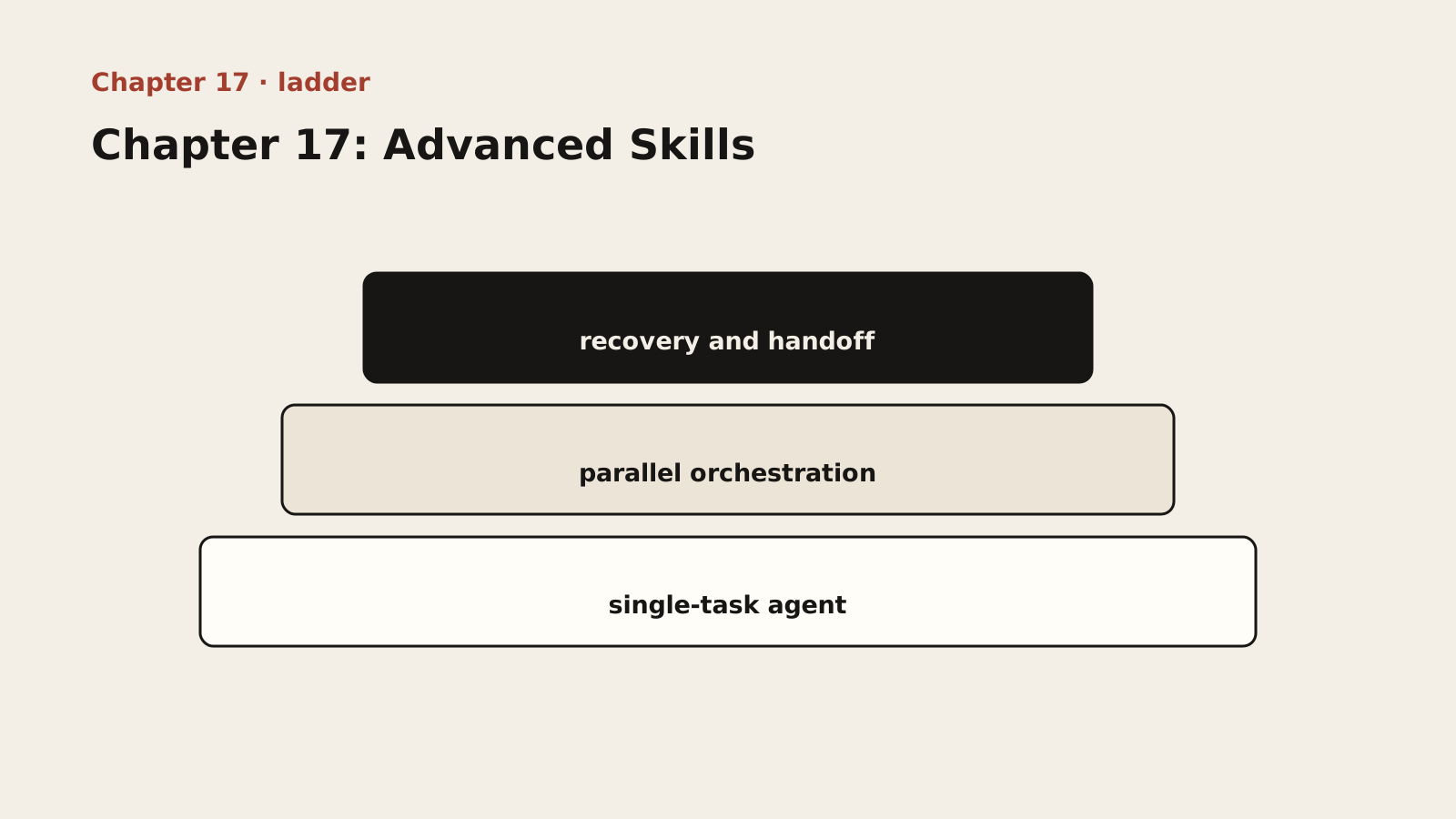
Diagram text description
The advanced-skill progression is drawn as three steps: single-task agent supports parallel orchestration, which supports recovery and handoff. This is a prerequisite structure, not an importance ranking. Missing evidence in a lower layer means the upper result is not established.
Relationship semantics: The layers form bottom-up prerequisites; an upper layer cannot compensate for a lower gap, so diagnosis returns to the earliest failed layer.
Adapted public course. Concepts, procedures and examples are adapted from the internal textbook. Case sizes, timings, improvement figures and target thresholds are illustrative, not site delivery results or universal standards. Verify tools, platforms and skills in your environment. Prompts do not grant permissions and retry counts do not authorize recovery. Preserve work and verify targets, sharing and external-state effects first.
Lesson explanation
17.1 Project Orchestration (Orchestrator): Dependency-Tree Management, Context Isolation, and Integration Acceptance
Why orchestration is needed: One feature done right, and ten features combined can all be wrong — sequence decides everything. When you have four features to finish within a month and you decide to “push in parallel” — letting AI write code for all four features at once — a week later you find: feature A’s database model conflicts with feature B’s, feature C depends on an API that hasn’t been built yet, feature D’s API interface definition has been changed three times… The project falls into a deadlock where “all features wait on and depend on each other.”
The single-feature development flow is clear: decompose, code, inspect, solidify. But with multiple features, the problem is no longer “how to build one feature” but “how to arrange the order of these features.” Features are not “independent walls” but “buildings sharing a foundation” — sharing database tables, sharing APIs, sharing component libraries. You need a “traffic controller” to manage these shared resources.
Core principles:
- A feature is a task: For Orchestrator, the smallest execution unit is a complete feature. It asks only three questions: which prerequisite features does this feature depend on? (dependency ordering); has this feature passed inspection? (quality gate); after this feature is done, does the overall project integration test pass? (integration validation).
- Progress is state: Orchestrator manages cross-session project state. Progress state machine: TODO, IN_PROGRESS, DONE / BLOCKED. Key rule: only a feature that has passed inspection can be marked DONE.
- Integration is the red line: After each feature passes its own inspection, cross-feature integration checks are mandatory — can feature A’s API output be correctly consumed by feature B? Is feature A’s new data model compatible with feature B? Does the overall test pass? A single feature being fine does not equal the whole system being fine.
Dependency-tree management: Orchestrator’s core capability is managing dependencies between features:
| Dependency type | Description | Example |
|---|---|---|
| Hard dependency | Feature B must wait for feature A to finish before starting | Build the login API first (A), then the profile center (B) |
| Soft dependency | Feature B can run in parallel with A, but needs A’s interface definition | Use mock data in place of A’s real output |
| No dependency | Feature B does not depend on feature A at all | User management and system configuration are usually independent |
Deriving the optimal order: A is a root node with no dependencies, do it first; C is independent and can run in parallel with A; B depends on A, do it after A; D depends on A + B, do it last. Optimal order: A and C in parallel, then B, then D. If you ignore this order — for example, doing B before A — B’s code will need substantial rewriting after A is done, because when A does not exist, the AI will “guess” a definition for the auth API, and that guess will very likely differ from the actual A.
Context isolation and reset: The biggest trap in multi-feature development is “doing all features in one conversation.” Orchestrator’s solution: each feature uses an independent conversation context — feature A’s conversation contains none of feature B’s information, and vice versa. But feature B needs to know feature A’s API definition to call it correctly; the answer lives in the blueprint (CONTEXT.md): Orchestrator updates the blueprint before each new feature starts, freezing the previous feature’s API contracts and data models into the blueprint. The conversations are isolated, but information flows through the blueprint.
Progress persistence: Progress information is written to the file system rather than living only in conversation context:
Example type: reference. Reference fragment; it is not guaranteed to run alone. Adapt it to the lesson context, project versions and real interfaces, then validate with observed output.
.agents/
├── job.state.json     # machine-readable complete project state
└── job.progress.md    # human-readable append-only progress ledger
Example of job.state.json:
Example type: reference. Reference fragment; it is not guaranteed to run alone. Adapt it to the lesson context, project versions and real interfaces, then validate with observed output.
{
  "projectName": "Order Management System",
  "phases": [
    {
      "name": "Phase 1: Foundation",
      "milestones": [
        { "id": "1.1", "name": "Project Init", "status": "DONE" },
        { "id": "1.2", "name": "Database Setup", "status": "DONE" },
        { "id": "1.3", "name": "User Auth", "status": "DONE" }
      ]
    },
    {
      "name": "Phase 2: Core Features",
      "milestones": [
        { "id": "2.1", "name": "Order List", "status": "DONE" },
        { "id": "2.2", "name": "Create Order", "status": "IN_PROGRESS" },
        { "id": "2.3", "name": "Order Detail", "status": "TODO" }
      ]
    }
  ],
  "currentMilestone": "2.2",
  "updatedAt": "2026-07-25T10:30:00Z"
}
Even if the entire conversation context is lost, project progress can be fully restored from these files.
Exception handling: A feature is blocked (after N failures it is marked BLOCKED and the user is notified; an authorized human decides on manual intervention or dependency changes; lowering standards must not turn failure into PASS); cross-feature integration finds a problem (an integration-issue report is generated and the user decides — no auto-fix); requirements change mid-project (the affected features are re-marked TODO, the blueprint is updated, and the affected features plus their downstream dependencies are re-executed).
17.2 Fully Automated Build (Job): The Eight-Stage Process, Degradation Strategy, and Usage Boundaries
Positioning: Job sits at the very top of the skill system. Its reason for existing: wrapping the “from zero to deployment” chain — eight links — into one automated process.
Example type: pseudocode. Pseudocode; it is not executable. It expresses decision order only, so implementation must supply real interfaces, authority and error handling.
Scaffolding → Requirements Analysis → Architecture Design → Frontend Design → POC (optional) → Feature Development → Integration Acceptance → Deployment Config GenerationDivision of labor across the eight stages — what the AI does, what the human does, and where the boundary lies at each stage; this is the most important part of Job’s design:
| Stage | What the AI does | The human’s role |
|---|---|---|
| 1. Scaffolding | Generate directory structure, config files, and README from the stack template | Confirm the template choice |
| 2. Requirements analysis | Invoke the Requirements skill, guide the user to state requirements, produce REQUIREMENTS.md | Answer key questions and confirm the requirements document |
| 3. Architecture design | Invoke the Architect skill, produce CONTEXT.md from the requirements document | Confirm technology choices, data model, and API design |
| 4. Frontend design | Invoke the Frontend Architect skill, produce the frontend design document | Confirm UI style and component division |
| 5. High-fidelity prototype (optional) | Ship a frontend-only prototype first, then develop after the effect is confirmed | Confirm the prototype effect |
| 6. Feature development | Invoke Orchestrator to implement features one by one in dependency order | Confirm at key milestones |
| 7. Integration acceptance | Check the correctness of cross-feature integration | Make the final judgment |
| 8. Deployment config generation | Generate Dockerfile and CI/CD configuration from the project structure | Confirm the deployment target environment |
Mode selection: normal mode (show a plan and wait for confirmation at each stage; suited to new projects, unfamiliar stacks, or unclear requirements); auto mode (execute directly after the milestone plan is confirmed; suited to mature stacks and clear requirements); silent mode (automatic execution under the same Section 19.3 safeguards, for validated pipelines or CI/CD; it grants neither business-decision nor production-release authority).
State-driven architecture: Job’s core design is “state-driven” — all progress is written to the file system, and each stage’s state decides what happens next. Resuming after an interrupted conversation: read job.state.json, find the current stage, and continue from there.
Degradation strategy: Section 19.3 is the common authority boundary. Grant automatic execution only with a mature blueprint, a verified technical path, low risk, and a complete testing grid and key acceptance checks. Failed gates, unknown results, or new risks downgrade the execution mode to research → strategize → implement; stop for human judgment if risk cannot be bounded. Continue only through an already approved fallback that does not affect critical requirements, while retaining the failure status. Changes to acceptance standards, customer commitments, or delivery scope require an authorized human decision and record. An automation failure cannot become PASS by lowering the bar.
Usage boundaries: when should you NOT use Job?
- Extremely vague requirements — if you don’t even know what you’re building, don’t say “fully automatic”; do requirements analysis first;
- Immature stack — when you need to try new technology and run POC validation, one-click full automation is not suitable;
- Deep customization needed — projects with special security, performance, or compliance requirements have many stages that need human intervention;
- Projects with a large existing codebase — Job is designed for “from zero”; existing projects should use Orchestrator or the Next skill.
In these scenarios, prefer the flexible combination of Orchestrator + Workflow over the fully automated Job.
17.3 Special-Scenario Skills: Code Cloning (Cloner), High-Fidelity Prototype (POC), Legacy Recon, and Project Continuation (Next)
Code Cloner — for when you need to implement a new feature by referencing existing code. You have a feature whose implementation pattern is identical to another feature in the project, only the business logic differs. With Cloner you can “implement that feature following this pattern” instead of writing from scratch. Core method: analyze the existing code’s pattern and implement the new feature in the same style and structure. Advanced use: analyze several existing features at once, extract a common pattern template, then apply it in batch.
High-Fidelity Prototype (POC) — for when you are unsure whether a solution is feasible. POC generates high-fidelity, frontend-only pages using mock data, with no backend involvement. Advanced use: POC can serve as a “requirements-confirmation tool” — let the business side confirm requirements after seeing the actual interface, reducing requirement changes.
Legacy Recon — for when you need to migrate from a legacy system to a new one. When you take over a legacy project with no documentation, no tests, and no blueprint, Legacy Recon first scans the code, reconstructs the architecture, and distills a blueprint, then starts the transformation. Advanced use: do a “field-level comparison” first — compare the legacy and new systems field by field to ensure nothing is missed. For “legacy system migration,” when existing information is more reliable than “re-analysis,” prioritize the existing information — the legacy system is already running in production, so its functional description is an accurate mapping of genuine requirements, more precise than any “analysis.”
Project Continuation (Next) — for when you take over a half-finished project. A project that someone else built halfway is handed to you; Next first analyzes the current state, identifies incomplete work, and establishes context. Advanced use: first assess the project’s “code size” — source file count, lines of code, test coverage — then decide whether to continue development or rebuild.
Trigger logic summary: existing code you can reuse, use Cloner (don’t write from scratch); a legacy system to migrate, use Legacy Recon (don’t design from the ground up); a project someone else built halfway, use Next (don’t re-understand from scratch); unsure whether a solution works, use POC (validate before developing); a project needs comprehensive testing, use QA (don’t rely on manual testing alone).
17.4 Quality Assurance (QA): Testing Strategy and Quality Gates
What QA is not: QA is not “writing tests”; it is “designing a testing strategy + generating test cases + executing tests + reporting results.”
Why an independent QA skill is needed: After a project is complete, systematic test coverage is required. The problems QA solves: which layers should the testing strategy cover (unit / integration / end-to-end)? What is the test coverage target? How do you establish an unbreachable quality red line?
Difference from Inspector: Inspector “verifies whether AI-generated code matches the blueprint” (for a single milestone); QA is “comprehensive testing strategy and quality gates” (for the entire project). Inspector guards each door; QA designs the whole defense line.
The evolution of test-driven development (TDD) in the AI era: Traditional TDD writes test cases first, then writes code yourself to pass them; in the AI era, you first set “acceptance criteria,” then let the AI write the code (inspection-driven development). Before letting the AI output any substantive line of code, the architect must feed that node’s acceptance rules to the AI as a prompt. (See Chapter 9.)
Independent exercise
Use fictional or authorized deidentified material. Answer independently before revealing the reference. Save chapter-17.md with versions, decisions, evidence and gaps.
Split classification, API and UI into three tasks. Specify parallel work, contract freezing, integration ownership and failure fallback.
Required chapter artifact: advanced-skill progression
The submission for this independent exercise must contain the evidence below. The existing prompts supply content but do not replace these acceptance items.
- O1: The advanced-skill progression orders single-task agent, parallel orchestration and recovery and handoff by dependency
- O2: Every layer in the advanced-skill progression states its input, completion rule and reviewable evidence
- O3: The artifact records escalation criteria, parallel boundaries and a recovery point for one complex task
Reveal reference feedback (answer first)
Reference feedback
After confirming a shared contract, API and UI may proceed against it, but integration must verify actual behavior. Assign scopes, checks and owners. Fall back to sequential diagnosis without lowering criteria. Orchestration does not grant external-write, merge or deployment authority.
Self-review and next steps
Check whether your decision is explicit, evidence reproducible and unknowns honestly recorded. The reference illustrates one defensible approach, not a unique answer. Seek peer review for alternatives with equivalent evidence. Mark unsupported parts unfinished and revisit the corresponding step.
Sources and boundaries
Registered sources support only the external claims used here. The advanced-skill progression, example numbers and exercise scenario are internal instructional design and require project-specific validation.
- Git reference
Git project · 2026-09-17 · Versions, branches, commits and recovery operations must be verified against repository state.
Record lesson practice
Only a browser self-check is saved. No work is uploaded, reviewed or certified. Keep evidence and gaps in your own chapter file.