Free public course · 12/40
Chapter 12: Architecture Design: The Art of the Blueprint (CONTEXT.md)
Lesson objectives
Required artifact: CONTEXT blueprint
O1 · Can distinguish the scope, owner and handoff between in-system responsibility and external dependency (artifact: CONTEXT blueprint)
Evidence: The CONTEXT blueprint states the scope and owner of both in-system responsibility and external dependency
O2 · Can construct a CONTEXT blueprint with inclusions, exclusions and human acceptance conditions (artifact: CONTEXT blueprint)
Evidence: The CONTEXT blueprint contains at least one exclusion, one handoff and one acceptance condition
O3 · Can use a CONTEXT blueprint to separate system duties, external dependencies and human review (artifact: CONTEXT blueprint)
Evidence: The artifact marks internal/external boundaries, authority and acceptance interfaces for one solution
Before this lesson: Chapter 11: Requirements Analysis: From Vague to Precise
Novice path
Chapter transfer task: Can use a CONTEXT blueprint to separate system duties, external dependencies and human review. Use the diagram's boundary relationship to complete the first evidence item in the CONTEXT blueprint, then check each owner and decision rule.
Experienced path
Apply this task to a current project before reading the explanation: Can use a CONTEXT blueprint to separate system duties, external dependencies and human review. Submit the CONTEXT blueprint, then check the relationship type, missing evidence and authority boundary.
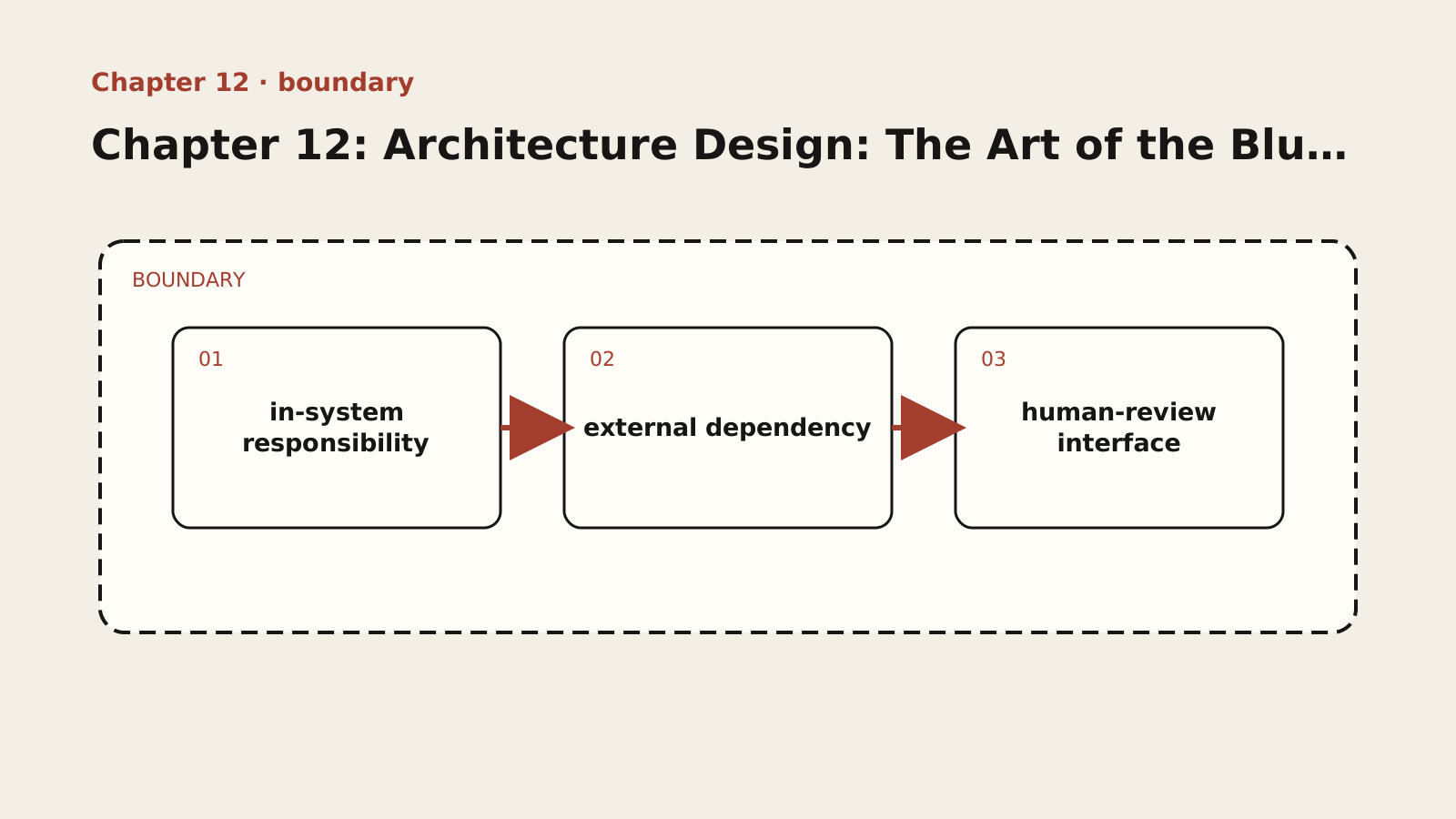
Diagram text description
A dashed frame marks the scope of the CONTEXT blueprint. Three cards represent in-system responsibility, external dependency and human-review interface. Arrows show defined handoffs, not interchangeable responsibilities; crossing the frame or lacking acceptance evidence requires a stop and escalation.
Relationship semantics: The dashed frame is the responsibility boundary; handoffs connect the three elements, and work stops when evidence or authority crosses that boundary.
Adapted public course. Concepts, procedures and examples are adapted from the internal textbook. Case sizes, timings, improvement figures and target thresholds are illustrative, not site delivery results or universal standards. Verify tools, platforms and skills in your environment. Prompts do not grant permissions and retry counts do not authorize recovery. Preserve work and verify targets, sharing and external-state effects first.
Lesson explanation
This chapter and Chapter 13 maintain documents with distinct responsibilities:
| Document | Question answered | Content ownership |
|---|---|---|
| CONTEXT.md: project blueprint | What are we building, and why? | Overview, core terminology, tech stack and rationale, data model, API contracts, directory layout, milestones |
| ARCHITECTURE.md: constraints constitution | Which implementation approaches are unacceptable (how-not-to)? | Prohibitions, red lines, negative-space boundaries, lessons learned; template in Chapter 13 |
Maintain the stack, models, interfaces, and directories only in CONTEXT.md. ARCHITECTURE.md references these facts and specifies boundaries that must not be crossed. The blueprint must also reference the constitution: with Chapter 13’s directory skeleton, root CONTEXT.md should say “Read .docs/ARCHITECTURE.md before implementation.” If a blueprint change touches a red line, resolve the document conflict and record the decision before implementation; do not leave AI to choose which document to obey.
12.1 The Essence of a Blueprint: Not a Document, but a “Constrainer”
You ask AI to build a “user management module.” It obliges and finishes in an hour — using Express + MongoDB. You notice something is wrong: your project uses Next.js + PostgreSQL. You ask it to rewrite, and it switches to Prisma + Postgres. But this time it changed the field naming style in the user table from camelCase to snake_case — and all the code you had already written now has to change along with it.
Where did the problem come from? Not from AI being disobedient, but from you not giving it a “map.” You gave it a destination (“user management module”) but never told it which roads to take and which roads are off-limits. AI can only choose a route by intuition, and intuition is the least reliable thing in engineering.
In AI coding, a blueprint plays a role even more critical than in traditional architecture design: it is the common entry point for project facts. AI also needs the constraints constitution, task requirements, and relevant code; the blueprint explains the purpose these materials serve.
AI has no long-term memory. Every conversation, it sees a blank sheet. Without a blueprint, AI’s “default behavior” is to pick the highest-probability solution from its training data — and what dominates that data? React + Node.js + MongoDB CRUD examples. So if you do not spell things out, AI will default to this trio. A more insidious problem is naming style: in the first conversation AI used camelCase (because the sample code you gave was camelCase); in the second conversation (after you reset the context) AI did not see the earlier example and used snake_case (because snake_case is also common in training data). The code generated in the two conversations has inconsistent field naming styles, and the data models conflict.
The essence of a blueprint is not a document; it is a “constrainer.” By making project facts explicit, it narrows AI’s candidate approaches to the project’s scope. For example, CONTEXT.md records the reasons for choosing Prisma and the field contracts, while ARCHITECTURE.md says “do not bypass the ORM” and “do not break existing naming contracts.” Reading both gives a new session consistent grounds for action; compliance still requires acceptance checks.
So a blueprint must be complete (incompleteness means AI still has to guess the parts the blueprint does not cover), accurate (inaccuracy means AI makes decisions based on wrong information), and readable (unreadability means AI cannot quickly understand it, wasting the context window). A blueprint is not optional overhead; it is a mandatory foundation for AI coding.
12.2 The Complete Structure of CONTEXT.md (Project Overview, Core Glossary, Tech Stack, Data Model, API Contracts, Directory Layout, Milestone Dependency Tree)
A complete blueprint (CONTEXT.md) should contain the following seven parts. Record confirmed facts and reasons for choices, explicitly mark unresolved items, and cross-reference constraint rules in ARCHITECTURE.md.
- Project overview.
Example type: reference. Reference fragment; it is not guaranteed to run alone. Adapt it to the lesson context, project versions and real interfaces, then validate with observed output.
## Project Name
One-sentence description: what system this is, what problem it solves.

Implementation constraints: Constraints constitution

## Core Value Proposition
What is the fundamental reason this system exists? Why do users choose it over alternatives?- Core glossary — the most important part of the blueprint.
The glossary is the most easily neglected yet most important part of a blueprint. Before discussing technical solutions, first pin down the definitions of the core domain terms. Vague terminology means the architecture is vague from the very start.
Why is the glossary so important? Because the damage caused by vague terms far exceeds what you imagine. Chapter 8’s “three meanings of order” example shows how sales, finance, and warehouse can assign different boundaries to one word; such divergence leads to completely different data models, state machines, and API designs.
Consider a composite legacy-project case. While a user system is developed, the terms “customer” and “user” are mixed. AI creates a customer table in feature A and a user table in feature B; they store similar data but use different fields and relationships. As dependencies accumulate, merging them affects many joins and creates substantial migration cost. The text does not invent “more than 20 queries” or “three months” as a real record; the case only shows how terminological divergence accumulates along code paths.
The discipline for maintaining the glossary is simple: when you discover a new term, define it immediately; do not wait until the “design phase” to backfill. During requirements analysis, when you hear a business person use a new word, immediately ask “what does this word mean?” and write the definition into the glossary. Do not wait until you are designing database tables to go back and ask — by then you may have already forgotten.
- Tech stack.
Example type: reference. Reference fragment; it is not guaranteed to run alone. Adapt it to the lesson context, project versions and real interfaces, then validate with observed output.
## Tech Stack
| Layer    | Technology   | Version | Notes                |
|:---------|:------------|:--------|:---------------|
| Frontend framework | Next.js     | 14+     | App Router     |
| Styling | Tailwind CSS| 3.x     | --              |
| Database   | PostgreSQL  | 15+     | Connected via Prisma |
| ORM      | Prisma      | 5.x     | --              |
| Deployment | Vercel | -- | Auto deploy |- Data model.
Example type: reference. Reference fragment; it is not guaranteed to run alone. Adapt it to the lesson context, project versions and real interfaces, then validate with observed output.
## Data Model
### User
- id: String (UUID) -- primary key
- email: String -- unique, used for login
- name: String -- display name
- role: Enum(ADMIN, USER) -- role
- createdAt: DateTime
- updatedAt: DateTime

### Order
- id: String (UUID) -- primary key
- userId: String -- foreign key, references User
- status: Enum(...) -- order status
- totalAmount: Decimal -- total amount
- createdAt: DateTime- API contracts.
Example type: reference. Reference fragment; it is not guaranteed to run alone. Adapt it to the lesson context, project versions and real interfaces, then validate with observed output.
## API Endpoints
### GET /api/orders
Get the order list.
Parameters:
- page: number (default 1)
- size: number (default 20)
- status: OrderStatus (optional, filter by status)
Returns:
{
  data: Order[]
  total: number
  page: number
  size: number
}- Directory layout.
Example type: reference. Reference fragment; it is not guaranteed to run alone. Adapt it to the lesson context, project versions and real interfaces, then validate with observed output.
## Directory Structure
src/
├── app/              # Next.js App Router pages
│   ├── api/          # API routes
│   └── orders/       # order-related pages
├── components/       # shared components
│   ├── ui/           # base UI components
│   └── features/     # business components
├── lib/              # utility functions and configuration
└── types/ # TypeScript type definitions- Milestone dependency tree.
Example type: reference. Reference fragment; it is not guaranteed to run alone. Adapt it to the lesson context, project versions and real interfaces, then validate with observed output.
## Milestones
Phase 1: Foundation
1.1 Project init → 1.2 Database setup → 1.3 User authentication
Phase 2: Core features
2.1 Order list (depends on 1.3)
2.2 Create order (depends on 1.3)
2.3 Order detail (depends on 2.1)
Phase 3: Enhancements
3.1 Order search (depends on 2.1)
3.2 Order export (depends on 2.2)
12.3 Four Principles of Architecture Design: Propose Instead of Ask, Skeleton First, Terminology First, Bidirectional Derivation
Principle one: propose instead of ask.
This is a principle that looks simple but is extremely hard to execute. It goes against our instinct as “developers” — we are used to asking questions, used to gathering information before making judgments. But in architecture design, “asking” is the most dangerous mode of communication, for two reasons.
First, the user’s information asymmetry. If you ask the user to choose “MySQL or PostgreSQL,” the user may only know that MySQL is free, unaware of the value PostgreSQL’s JSONB support brings to the business. When you make users make decisions they are not equipped to make, the answers you get are often random and unreliable.
Second, AI’s “default answer” trap. If you ask AI “which database should we use,” AI will give the most “common” answer — because common = high probability in the training data. But this “common” choice is not necessarily right for your project. For example, for a small internal tool with tiny data volume that needs zero ops, AI might recommend PostgreSQL (because it is “mainstream”), when SQLite is the more suitable choice.
The correct approach is to “propose.” As the architect, you research, analyze, and weigh trade-offs based on the requirements, then give a clear recommendation with reasons and alternatives. The user only needs to do one thing: confirm or adjust.
Here is a counterintuitive insight: proposing is not “deciding for the user,” it is “enabling the user to decide.” When you say “I recommend SQLite, reasons: zero deployment, handles your data volume (< 100k rows), no DBA needed. If you expect the data volume to exceed 1 million rows, PostgreSQL is the better choice, but requires extra deployment,” the user can immediately make a judgment upon seeing this, instead of picking randomly out of the anxiety of “which database should I use.”
Principle two: skeleton first.
Before asking about any details, first generate a complete skeleton blueprint — with most fields filled with placeholders. Let the user see the full shape of the final product, rather than asking item by item over a blank sheet.
Why is a “skeleton with placeholders” more valuable than “a blank sheet”? Because people (and AI) fear blankness and have an instinct to fill things in. Give you a blank sheet and ask you to draw a house, and you may agonize over “how big should the house be,” “what style,” “which colors.” But give you a sketch with the outline already drawn and ask you to color it, and you can start working immediately. A skeleton with placeholders is more valuable than a blank sheet.
Principle three: terminology first.
Before discussing the tech stack, data model, or API, first pin down the core domain terms. A common mistake: the user says “I want to build an order management system,” and you dive straight into designing database tables. But the word “order” means completely different things in different business contexts — an e-commerce order (including products, logistics, refunds), a restaurant order (including tables, dishes, kitchen printing), an enterprise purchase order (including approvals, reconciliation, payment) — the three differ enormously. Designing database tables before terminology is aligned is almost guaranteed to go wrong.
The correct approach: first align with the user — what exactly do you mean by “order”? What states does it include? Are “cancel an order” and “return an item” the same concept? Domain terminology is the first blueprint of the architecture. The data model, API naming, and code structure all derive from the glossary.
Principle four: bidirectional derivation.
A good architect can do both kinds of thinking at once:
- Top-down: derive the system structure from requirements (user needs → feature list → data model → API → milestones);
- Bottom-up: derive the actual architecture from existing code (scan files → recognize patterns → abstract structure → distill the blueprint).
For new projects use top-down — start from requirements and derive the architecture step by step. For existing projects, start bottom-up — first scan the code, recognize the “actual architecture” (not the “ideal architecture”), then distill the blueprint, and adjust top-down on top of that. For example: taking over a 30,000-line legacy project with no documentation. If you design straight from the top down, the “ideal architecture” you design may differ hugely from the actual code and be impossible to land. The correct approach: first go bottom-up — scan the file structure, recognize the module boundaries, understand the data flow — distill a blueprint of the “current architecture,” and on that basis design improvements top-down.
12.4 Architecture Decision Records (ADR): When You Need One, When to Skip It
An ADR (Architecture Decision Record) is used to record architecture decisions that are “hard to reverse.” But what matters is knowing when an ADR is needed and when it is not.
An ADR is needed only when all three of the following conditions hold:
- Hard to reverse — changing your mind later carries a significant cost;
- Surprising without context — a future reader will wonder “why did they do it this way?”;
- The outcome of a genuine trade-off — legitimate alternatives actually exist.
If any one is missing, skip the ADR. For example, “choosing React as the frontend framework” — if the team has already used React for 5 years, this is not a “genuine trade-off” and needs no ADR. But “choosing Prisma over Drizzle” — both are excellent ORMs, and choosing one requires weighing trade-offs; this is an ADR scenario.
12.5 Common Architecture Design Mistakes: Overengineering, Vague Terminology, Ignoring Data Flow
Mistake one: overengineering. Designing for “possible future needs” introduces unnecessary complexity. An internal tool with only 10 users gets a microservices architecture — “what if the user base grows later?” But “later” may never come. Correct approach: design for current needs, note possible future extension points, but do not add complexity to implement those extension points now.
Mistake two: vague terminology. The team holds different understandings of the same term, leading to inconsistent data models, API naming, and code structure. Correct approach: create and confirm a glossary as the first step of architecture design.
Mistake three: ignoring data flow. Architecture design only pays attention to “what modules exist,” not to “how data flows between the modules.” The result: clean module boundaries but chaotic data flow — module A and module B are clearly separated, but the data flow requires A→B, and A exposes no data interface, so B reads A’s database directly; the architecture design is wasted. Correct approach: draw a data flow diagram in the architecture design, making explicit where the data comes from, what processing it goes through, where it is stored, and who consumes it.
[Hands-on] Design a CONTEXT.md Blueprint for a Sample Project
Task: Design a complete CONTEXT.md blueprint for a “team task management system,” containing all seven parts. Feature requirements: task board (list / detail / drag-and-drop), task comments, member management, daily standup reminders.
Guidance:
- Build the glossary first — what is the precise definition of “task,” “board,” “member,” and “standup” each?
- Have AI generate the skeleton using the seven-part blueprint structure and templates (see Chapter 12, Section 12.2), then fill it in item by item.
- For the tech stack, “propose instead of ask” — give a clear recommendation + reasons + alternatives.
- Break down the milestone dependency tree using the structural milestone thinking from Chapter 10.
Acceptance criteria:
- Does the blueprint contain all seven parts?
- Is the glossary done first, with precise definitions?
- Does the tech stack come with a clear recommendation and reasons?
- Is each milestone an “independently verifiable engineering checkpoint”?
Pause and organise: complete the minimum loop
First write one relationship between in-system responsibility and external dependency, then place it in the CONTEXT blueprint. Confirm that this step has an input, decision and evidence before adding human-review interface; do not start the independent exercise until the three are connected.
Independent exercise
Use fictional or authorized deidentified material. Answer independently before revealing the reference. Save chapter-12.md with versions, decisions, evidence and gaps.
Write a one-page CONTEXT covering goals, vocabulary, technology, flow, API, directories and milestones, with a storage alternative and rejection reason.
Required chapter artifact: CONTEXT blueprint
The submission for this independent exercise must contain the evidence below. The existing prompts supply content but do not replace these acceptance items.
- O1: The CONTEXT blueprint states the scope and owner of both in-system responsibility and external dependency
- O2: The CONTEXT blueprint contains at least one exclusion, one handoff and one acceptance condition
- O3: The artifact marks internal/external boundaries, authority and acceptance interfaces for one solution
Reveal reference feedback (answer first)
Reference feedback
A no-storage exercise must state restart data loss and production limitations. Persistent storage requires access and maintenance decisions. Separate classification, API adaptation and UI; establish contracts first. Distinguish facts, decisions and unknowns rather than collecting unverified promises.
Self-review and next steps
Check whether your decision is explicit, evidence reproducible and unknowns honestly recorded. The reference illustrates one defensible approach, not a unique answer. Seek peer review for alternatives with equivalent evidence. Mark unsupported parts unfinished and revisit the corresponding step.
Sources and boundaries
Registered sources support only the external claims used here. The CONTEXT blueprint, example numbers and exercise scenario are internal instructional design and require project-specific validation.
- OWASP risks for LLM applications
OWASP Foundation · 2026-09-17 · Model output, sensitive information, tool permissions and human control require explicit risk boundaries.
Record lesson practice
Only a browser self-check is saved. No work is uploaded, reviewed or certified. Keep evidence and gaps in your own chapter file.